A Living Map of LLM Failure Modes: Dominant, Emerging, Squashed
Taxonomies are a map. You need a weather report.
Two weeks ago I published an ontology of 60-odd LLM failure modes. Hallucinated citations, unfaithful chains of thought, sycophancy, over-refusal, tool-invocation errors, and on down the list. That kind of ontology is useful the way a field guide is useful: it gives you vocabulary. It does not tell you what is happening in your specific production system this week.
If you run an LLM application of any size, the failure distribution you care about is narrower and more volatile than a taxonomy suggests. Maybe three of those 60 modes account for 80% of your pain. Maybe one of them only showed up after last Thursday’s deploy. Maybe a fix you shipped last month genuinely eliminated a category you used to see every day - or maybe it just moved the problem into a slightly different shape that nobody has named yet.
Three questions that teams actually ask:
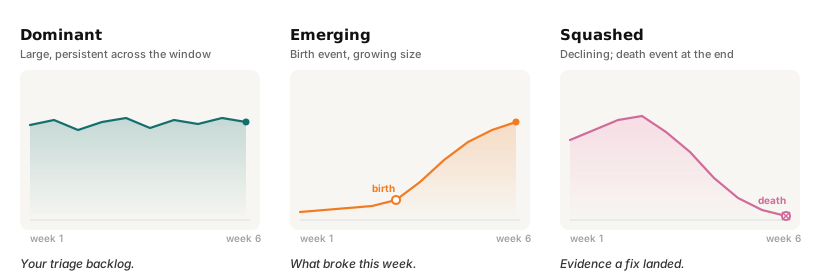
- What’s hurting me most right now? The dominant failure modes - the ones worth triaging first.
- What’s new since last week? The emerging failure modes - often the ones correlated with a recent deploy.
- Did the fix I shipped actually work? The squashed failure modes - evidence (or not) that a change in the system changed the failure distribution downstream.
Static analysis can’t answer these - by the time you sit down to write a failure taxonomy for your system, the distribution has already shifted. Aggregate score dashboards can’t either: a drop in mean score tells you something is wrong but not what, and a stable mean can easily hide a 15% mode that quietly replaced a 15% mode somewhere else.
What we want is a view that treats the failure distribution as an object that changes shape over time - and that lets you name the pieces of that object as they move.
The core idea: clusters as living objects
Treat each failure-mode cluster as an entity with a lifecycle. A cluster can be born (a new failure mode appears), grow, shrink, split into two distinct failure modes that used to look alike, merge with another cluster that turned out to be the same root cause, or die (a failure mode goes away). This vocabulary of cluster transitions isn’t new - it comes from the evolving-clusters literature, where it’s been used for over a decade to track how groupings in streaming data shift over time[4]. The broader “topics evolve, they aren’t snapshots” perspective goes back further still[6].
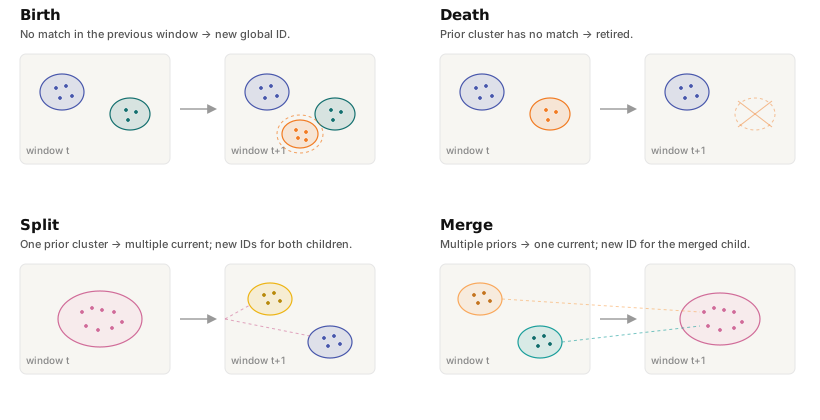
Each of these events is an operational signal with a distinct action attached to it:
- Split is often the most valuable - one bucket that looked like a single failure mode turns out to be two problems with separate fixes. You can feel the difference: “authentication errors” splits into “OAuth token expiry” and “stale session refresh” and suddenly you have two tickets instead of one shapeless investigation.
- Merge is the reverse - two clusters you were tracking separately were actually the same root cause. A cue to deduplicate your issue tracking.
- Birth and death are your deploy-to-failure feedback loop: what appeared, what disappeared, and when.
The pipeline
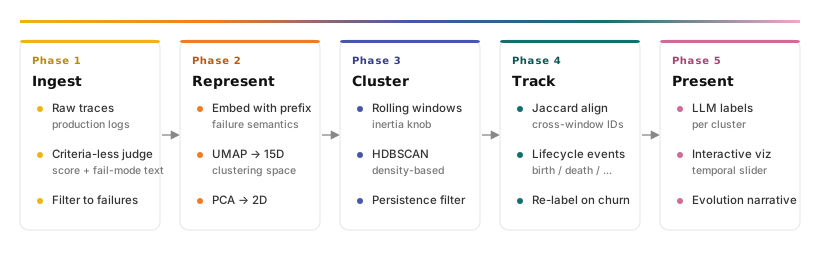
1. Score every trace, emit a failure description
We start with production traces - a stream of multi-turn conversations, each with an optional system prompt and a list of tool definitions. The first job is to decide which traces represent failures and to describe what went wrong in text we can cluster later.
We use a single-pass LLM judge with no rubric. No list of “bad behaviours” to check against, no taxonomy to map into. The judge is given the user turn, the system prompt, the tool definitions, and the assistant’s actual output, and asked to do two things: infer what a competent agent would have done from the context, and then describe the gap (if any) in 1–3 diagnostic sentences.
The approach is a simplified, single-ensemble variant of our earlier work on criteria-less LLM judging.
The prompt is short and strict about being diagnostic:
You are NOT given any explicit grading criteria. Your job is to evaluate the
ASSISTANT's performance across the conversation:
1. Infer from the user input, system prompt, and any tool definitions what a
   competent, helpful agent would do.
2. Compare the assistant's actual messages and tool calls against that ideal.
3. Score the assistant from 0 (egregiously bad) to 10 (excellent).
4. If the score is below 6, write a 1–3 sentence description of the SPECIFIC
   failure mode. Be diagnostic - say WHAT went wrong (e.g. "fabricated a
   citation", "called the wrong tool", "hallucinated a numeric value").
Why criteria-less. Static rubrics inherit the limitations of the person who wrote them. A “rate adherence to instructions” criterion catches roughly 90% of the instruction-following failures and zero of the failure modes nobody thought to add. We let the judge write freeform text because that text becomes the primary diagnostic record - the embedding clusters on it, the labelling LLM names clusters from it, and a human looking at a cluster sees something specific (“missing required JSON keys”, “wrong field extracted from form”) instead of a rubric-collapsed “instruction-following: 0.4”.
Traces with a score below a threshold (we use 6/10) continue to the clustering pipeline. Everything else is dropped.
2. Embed the failure description - with a prefix
Each failure description gets embedded. Before handing the text to the embedder (OpenAI’s text-embedding-3-large, 3072-dimensional), we wrap it with a short instruction prefix:
_FAILURE_PREFIX = "Failure mode described in this analysis:\n"
wrapped = [f"{_FAILURE_PREFIX}{t}" for t in texts]
That’s it. Two lines, ~8 extra tokens per text.
This is the “instruction-prefix” pattern from the modern embedding literature[3][8]: a short task descriptor at the front of the text re-weights the geometry of the resulting embedding toward a task-specific notion of similarity. Instead of “which of these texts are about the same topic?” you’re asking “which of these texts describe the same kind of failure?”
The prefix trick is the single highest-leverage line in the pipeline. Two failure descriptions can both prominently mention “API timeout” while being totally different failures - one is a genuine timeout, the other is the model confabulating that a timeout occurred. Without the prefix, topical similarity dominates and those two cluster together. With it, the embedder leans into the “what went wrong” frame and separates them.
How much does this matter in practice? We re-embedded 2,902 failure descriptions from a real production run twice - once with the prefix, once without - and clustered each variant identically. Without the prefix: 61 clusters, 32% noise, dominant cluster of 169 points. With the prefix: 45 clusters, 21% noise, dominant cluster of 353 points. The prefix doesn’t fragment failures into more clusters; it consolidates the genuinely-similar ones into bigger, cleaner groups and pulls a third of the noise into structure. ~18% of within-cluster trace pairs in the prefix run land in different clusters without it.
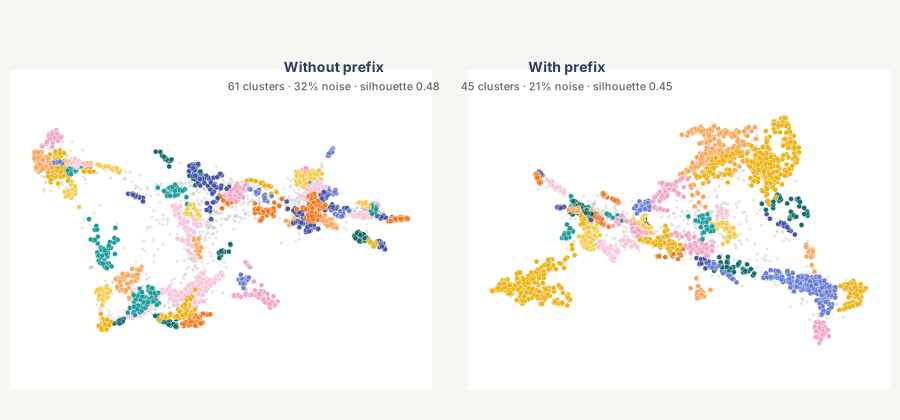
Same 2,902 failure descriptions, same UMAP+HDBSCAN config. Left: embedded raw. Right: embedded with the failure-mode prefix. The right panel has a third less noise and one cluster twice the size of the largest in the left panel - the prefix is consolidating a dominant failure mode into one coherent group instead of letting topical similarity scatter it across smaller buckets.
3. Fix a coordinate space, once
3072 dimensions is too many for HDBSCAN to do anything useful with; distances in that space are dominated by noise. We reduce twice:
- UMAP to 15D, fit once on the full embedding set. This is the clustering space.
- PCA from 15D to 2D, fit on the 15D UMAP output. This is the visualisation space.
Both are frozen after the first fit. Every trace gets a single 15D position used by HDBSCAN and a single 2D position used on screen, both stable for the lifetime of the analysis.
The UMAP-then-HDBSCAN topology for document clustering is now canonical - BERTopic uses the same shape[5]. What we’re doing differently is the second-stage PCA, which deserves a word - and an honest one.
PCA isn’t the most faithful 2D projection - it’s the most stable. We tested both: with the same HDBSCAN labels, a direct UMAP→2D projection puts 89% of any point’s 5 nearest visual neighbours in the same cluster, vs 82% for UMAP(15D)→PCA(2D). UMAP is in fact slightly better at making “looks close on screen” mean “is close in cluster space.” We use PCA anyway because it’s deterministic and orientation-stable: when the dataset grows by a frame, PCA axes stay put while a refit UMAP can rotate or flip the entire view. For an animated viz where you want frame-to-frame continuity, that stability is worth seven percentage points of local fidelity.
4. Cluster per window, with one knob for temporal inertia
Now the time-evolving part. Rather than clustering the whole dataset in one shot, we build a sequence of overlapping rolling windows. Each frame in the final viz displays one calendar interval (e.g. a week); HDBSCAN is fit on a rolling window that extends INERTIA_INTERVALS intervals back into history.
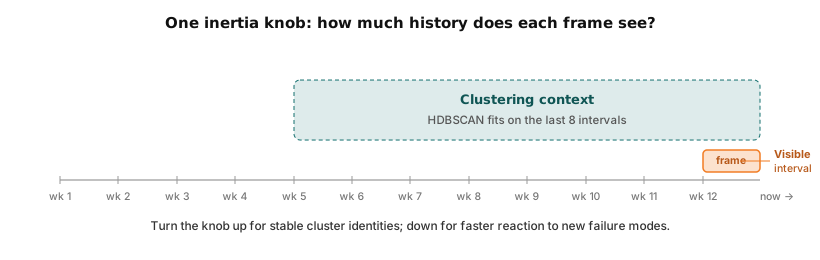
This is the single inertia knob of the system. High inertia (many intervals of history per fit) gives stable cluster identities frame-to-frame but slow reaction to new failure modes. Low inertia (few intervals) is responsive to new behaviour but noisier. One parameter, tune it once per deployment.
HDBSCAN is a good fit here[5]: it finds clusters of varying density without being told how many to find, and it naturally returns a -1 label for points that don’t belong to any cluster. The latter is important - in production trace data a meaningful share of failure descriptions are one-off weirdness that shouldn’t get its own cluster. We render those as small grey dots; they’re visible but don’t compete for attention with the real clusters.
5. Filter out the flickers
Rolling-window clustering produces a lot of one-frame phantom clusters - transient blips that HDBSCAN briefly groups together, then loses in the next window. Before anything else happens, we require that a cluster appear in at least MIN_CLUSTER_PERSISTENCE consecutive windows (default: two). Anything short-lived gets its label flipped to -1 and joins the noise.
This filter is mundane but non-negotiable. Without it the viz becomes unreadable because half the clusters are glitter.
6. Align clusters across frames by membership overlap
HDBSCAN’s cluster IDs are local - they’re assigned independently in each window. Frame 5 might call one cluster 3 and frame 6 might call the same underlying grouping 7. We need a global ID scheme that persists across frames so users can track “the same cluster” over time.
The matching rule is simple: for each current-frame cluster, find the previous-frame cluster with the highest membership overlap, measured by Jaccard similarity on the trace IDs[7]:
def _jaccard(a: set[str], b: set[str]) -> float:
    if not a and not b:
        return 0.0
    return len(a & b) / len(a | b)
If that overlap exceeds a threshold (we use 0.3), the new cluster inherits the previous global ID. Otherwise it gets a fresh one.
Why membership and not centroids. Centroids drift as new traces arrive and the UMAP space settles. Membership is the ground truth: “are these actually the same traces?” is a better identity question than “are these points near each other?” A cluster that migrates across the map is still the same cluster if most of its members are the same traces. This matters operationally too - your fix applies to the traces, not to a point in an embedding space.
7. Detect lifecycle events and re-label on churn
With a global ID scheme in place, the four lifecycle events fall out of the matching directly:
- Birth - a current cluster has no previous-frame match.
- Death - a previous cluster has no current-frame match.
- Split - one previous cluster maps to multiple current clusters. Mint fresh IDs for all children.
- Merge - multiple previous clusters map to one current cluster. Mint a fresh ID for the merged child.
Labels - the human-readable names that appear in the legend - are generated by an LLM from a sample of 20 traces nearest each cluster’s centroid. Stable clusters (those not touched by a lifecycle event) keep their existing label across frames for free. Clusters that are touched by an event get relabelled from scratch.
Always re-label on split and merge. If “authentication errors” splits into “OAuth token expiry” and “stale session refresh”, inheriting the parent label on both children is worse than useless - it hides the exact distinction that made the split valuable. The LLM cost of relabelling a handful of clusters per frame is negligible; the cost of misleading labels is not.
Reading the output
Once the pipeline runs end to end you get an interactive 2D map with a time slider. Each frame is a window; each coloured blob is a persistent cluster; a side table lists the current cluster labels and sizes; a short narrative at the bottom is LLM-generated from the lifecycle events and cluster contents.
Five patterns to look for:
- Dominant - a cluster that persists across many windows with a consistently large member count. That’s your triage backlog. Label quality matters most here; you’ll be reading these labels the most.
- Emerging - a fresh birth event with a growing member count. This is your “what broke this week” signal. Cross-reference against recent deploys; there’s usually a match.
- Squashed - a cluster whose size declines window over window, eventually ending in a death event. Evidence (not proof) that a fix landed in the system upstream is actually changing the production distribution. Pair with the specific deploy and you have a story.
- Split - usually the most valuable event in the whole viz. When one cluster divides into two with distinct labels, you’ve just discovered that what you thought was one problem is actually two. The two new labels are often the best starting point for a bug investigation that you couldn’t quite pin down before.
- Merge - rarer, and worth paying attention to. Two clusters you’ve been tracking turn out to share a root cause. Consolidate the tickets; one fix probably handles both.
What it looks like on a real trace stream
Before the synthetic example below: what the pipeline actually does when pointed at real production traces. We ran it on one customer’s six weeks of data - 2,902 failure descriptions, 94 distinct persistent clusters, with the top three accounting for 27% of named failures. Across the run the pipeline detected 86 cluster births, 70 deaths, 8 splits, and 2 merges. The most instructive event was a mid-March split: a single broad cluster of data-extraction failures divided into two distinct patterns - one where the assistant confidently extracted the wrong field from the available data, the other where it refused to extract a field that was clearly present. Same parent cluster, two completely different fixes - one for grounding, one for refusal calibration. On an aggregate score dashboard those would have looked like one problem.
Below is the same pipeline on a synthetic trace stream modelled on a production customer-support assistant - six weeks of traffic, roughly 2,000 failure traces, eleven persistent clusters. The slider scrubs through the intervals; the cluster labels in the legend are LLM-generated.
Try it. Drag the slider to 2026-03-18 - you’ll watch refused order-status lookups (the brand-orange cluster) collapse within two frames. Scroll back to early March and the same cluster sits at its pre-fix size. Hover any point to surface a synthetic failure description.
A few things to notice as you scrub:
- The dominant cluster - “wrong international shipping timelines” - sits in roughly the same position frame-to-frame even as its members turn over. This is the Jaccard alignment working: the cluster’s identity is stable because the membership is mostly stable.
- A new cluster - “generic canned response, not personalised” - is born late in the window. In a real deployment, that’s the cluster you’d correlate against the most recent deploy.
- One cluster - “refused order-status lookups” - grows through mid-March, peaks, then collapses within two intervals. That collapse is the signature of a fix landing upstream; the timeline points at a specific system-prompt change.
- A late split divides a generic “I don’t know” cluster into “uncalibrated refusals” and “no-alternative brush-offs”. On an aggregate dashboard those would have looked like one problem; the split tells you they’re two different fixes.
Alongside the chart the pipeline also produces a short LLM-written narrative summarising the same run. The viz above shows just the cluster map; the narrative looks like this:
Across the six-week window the dominant failure mode was wrong international shipping timelines, the largest cluster in every frame and the obvious candidate for the next round of work. Refused order-status lookups was a striking squashed cluster: it grew sharply through mid-March, peaked on 2026-03-17, and then collapsed within two intervals, consistent with a system-prompt change deployed on 2026-03-18. Two new clusters emerged in the final week - a late-breaking “I don’t know” without a follow-up and a generic canned response, not personalised cluster that correlates with the most recent deploy.
That prose is meant to be a briefing: the shape of the distribution, the interesting events, and what to look at next.
Design decisions worth stealing
If you’re building something adjacent to this, four choices are the ones that make the difference:
- Let the judge write text, not numbers. Use the LLM for classification (is this a failure?) and diagnostic description (what went wrong?); get the numeric output downstream from structure you can see, not from a scale the LLM was never trained to use reliably.
- Prefix the embedding with a task instruction. Eight extra tokens. Genuinely materially cleaner clusters. Skip this and everything downstream is fighting topical similarity.
- Split your coordinate spaces. Cluster in 15D; show in 2D. If you need an animated viz, prefer a deterministic projection (PCA on top of the 15D UMAP) over re-fitting UMAP straight to 2D - the layout stays oriented frame-to-frame even as data arrives. Trade about 7 percentage points of local-neighbourhood fidelity for that stability.
- Match clusters across time by membership, not geometry. Jaccard on trace IDs is robust to drift in the embedding space, reflects the operational question (“same traces affected?”), and makes split/merge detection trivial.
Limitations and open questions
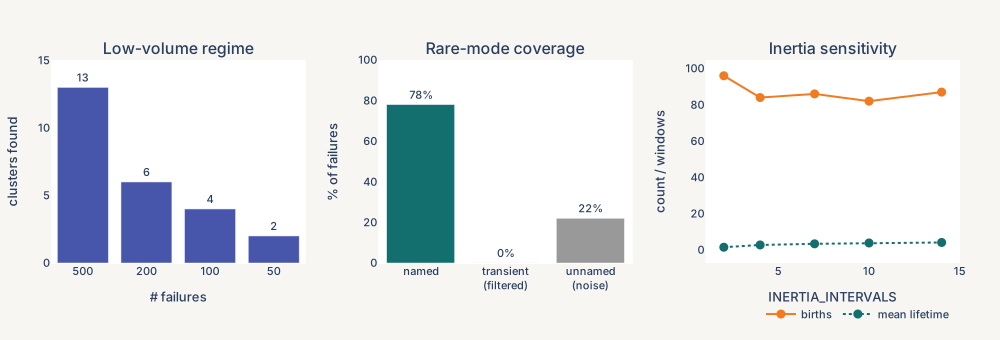
The pipeline works well on traffic volumes of a few hundred failures per week - that’s enough for HDBSCAN to find structure. Below that it breaks down predictably: subsampling our test deployment to 200 failures collapsed the run to 6 clusters; at 100 it dropped to 4 with the largest holding 26 traces; at 50 it found just 2 clusters with half the points in noise. Below ~200 failures, treat the output as “everything is the same” or “everything is noise” and look elsewhere for signal.
There’s also a hard floor on rare modes. On the same production run, 78% of failures landed in persistent named clusters; 22% are HDBSCAN noise in every window they appear - too rare or too dissimilar to group with anything. That tail is not zero, and it’s the set most likely to contain genuinely novel issues. The clustered view is a triage tool, not a complete map: assume some real failures are hiding in the noise and need a different surface to be found.
The inertia knob has a real cost. Across an INERTIA_INTERVALS sweep from 2 to 14 on the same data, mean cluster lifetime stretched from 1.5 to 4.1 windows - a 2.8× difference in how long a cluster persists frame-to-frame. Higher inertia gives stable identities and clean split/merge detection; lower inertia spots emerging modes faster but adds churn. There’s no free choice here; the right value depends on how fast your application’s failure mix actually moves.
Cluster shapes here aggregate failure descriptions from a specific gpt-5.4 judge run with a fixed prompt. We’ve researched generic LLM-judge behaviour in depth, and the per-trace scoring pipeline upstream is calibrated against expert reviewers. Different judges will shift exact cluster boundaries, but the framework - tracking persistent, emerging, and squashed modes by membership Jaccard - is judge-agnostic.
Where this lives in Composo
Composo Align already scores individual LLM traces with ~95% agreement with expert reviewers, replacing the 70%-ish agreement typical of LLM-as-a-judge with a calibrated, trained reward-model pipeline. Failure-mode clustering is the next abstraction up from that - instead of asking “is this one response good?” it asks “how is the distribution of failures changing?”
We’re currently trialling this with beta customers, with the clustering view running over traces they’re already sending to Composo.
Try this on your own data
Deploying this quarter? Book a diagnostic → We’ll run this pipeline on a sample of your traces and walk you through the cluster map together.
Early-stage team? Apply for the startup program → Three months free.
References
[1] L. Zheng et al., “Judging LLM-as-a-Judge with MT-Bench and Chatbot Arena,” in Advances in Neural Information Processing Systems (NeurIPS), 2023.
[2] Y. Liu et al., “G-Eval: NLG evaluation using GPT-4 with better human alignment,” in Proc. EMNLP, 2023.
[3] H. Su et al., “One embedder, any task: Instruction-finetuned text embeddings,” in Findings of the Association for Computational Linguistics: ACL, 2023.
[4] M. Spiliopoulou, I. Ntoutsi, Y. Theodoridis, and R. Schult, “MONIC: Modeling and monitoring cluster transitions,” in Proc. ACM SIGKDD, 2006.
[5] M. Grootendorst, “BERTopic: Neural topic modeling with a class-based TF-IDF procedure,” arXiv preprint, arXiv:2203.05794, 2022.
[6] D. M. Blei and J. D. Lafferty, “Dynamic topic models,” in Proc. ICML, 2006.
[7] D. Greene, D. Doyle, and P. Cunningham, “Tracking the evolution of communities in dynamic social networks,” in Proc. ASONAM, 2010.
[8] L. Wang et al., “Improving text embeddings with large language models,” arXiv preprint, arXiv:2401.00368, 2024.